Why we built it
Six years of Bubble, kept and corrected
Richard built client apps on Bubble for six years. He loved the feeling of being in control of what he built, and of being able to answer any question a client asked. He also knew where that way of building went wrong: the same database search copied onto every element, a workflow tab nobody could navigate, a debugger that could not be trusted.
Studio keeps the good parts and refuses the bad habits. A search is made once, by name. Any element reads it. Workflows sit on the element that starts them, not in a list of hundreds. The run timeline records what the app did, step by step, with the screen as it was at each moment.
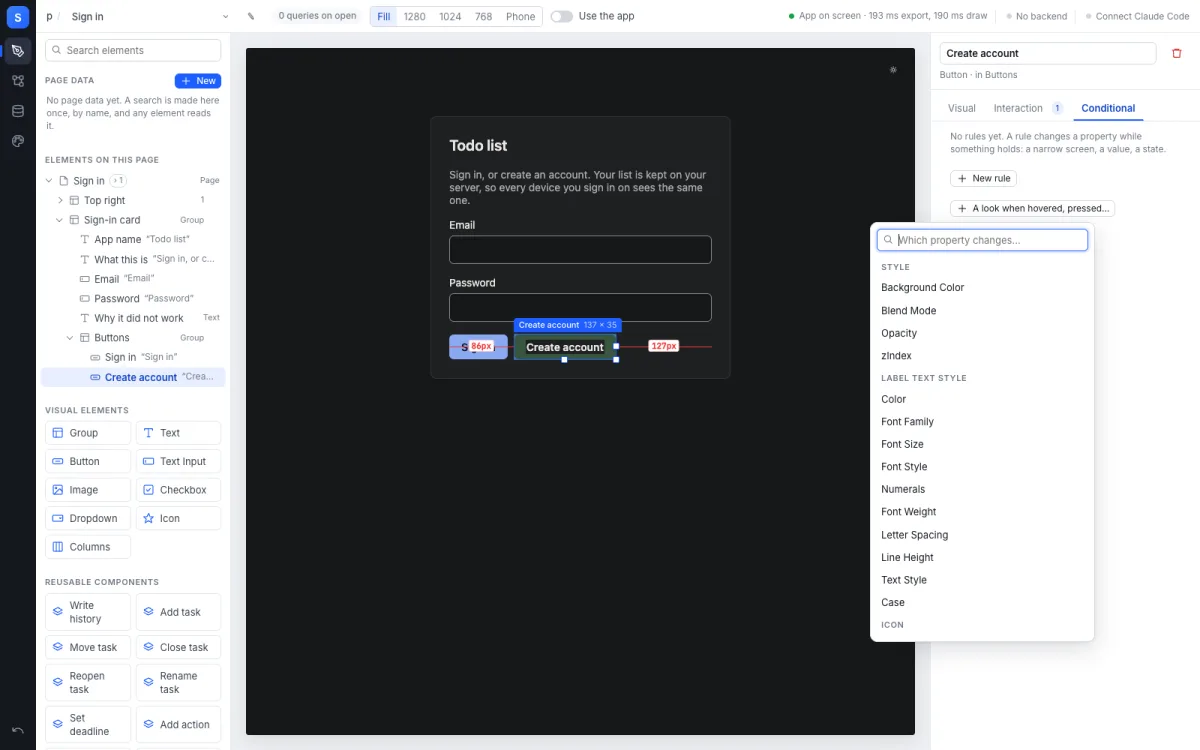
Design. The screen is the real app. The Create account button is selected, with its size and the distance to its neighbours drawn on it, and a rule is being added on the right.
What it does today
Three tabs, a timeline and Claude Code beside you
The screen is the real app
What you click on is your running app, not a picture of it. Click an element, drag it, resize it, and edit its properties in a typed panel. A red spacing guide shows margins and padding.
On the element that starts it
Every element with a workflow carries a mark. Hover it to see the steps in order. Open it to add a step, a Yes/No branch, or an expression built from chips or from JavaScript.
Made once, read anywhere
Types and fields, rows on the app’s backend and option sets. A search is a named item on the page, made once and read by any element that needs it.
What the app did, step by step
Press Record and use the app. Page data, workflows and the screen go on one axis, each step with its values in and out. Scrub back to see the screen as it was.
One folder, two editors
A file changed by Claude Code, VS Code or git pull is drawn in Studio without a reload. Connect Claude Code from the header and it works on the same folder you are looking at.
A site, from the menu
Publish writes the app as a static site with NodeGX’s own deploy. Its cloud functions go to its backend. The window says where the site is and what it talks to.
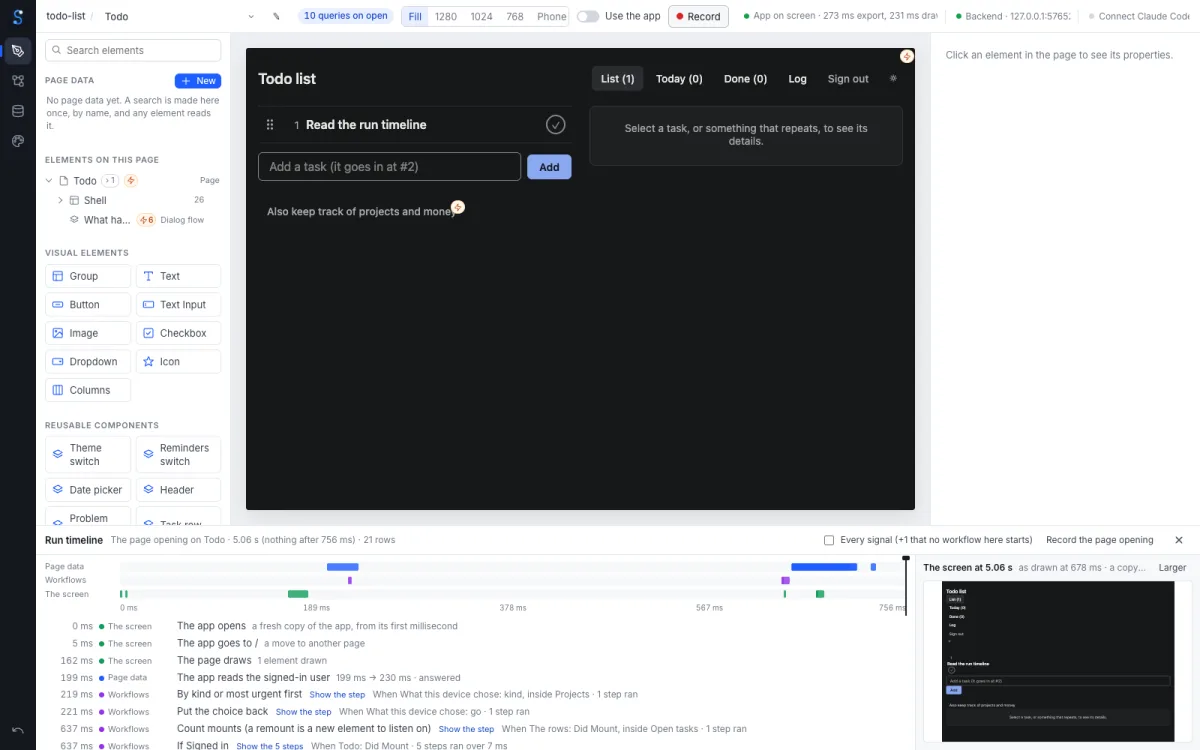
The run timeline. The todo list opening, recorded: what the page asked for, which workflows ran, and the screen as it was at the playhead.
Bring your app
Studio imports an app built on the Bubble platform
The importer turns your app into a NodeGX project: pages, elements, styles, workflows, expressions, option sets, reusable elements, custom states, data types, privacy rules and backend workflows. Anything it cannot map is listed in a report inside the new project and left in the graph as a labelled placeholder, so every page still opens.
We measured it on a real production app of 18 pages and 3,941 elements. The import had no validation errors. On that app, 153 searches were written on pages. Only 70 of them were distinct within their own page. The busiest page had one identical search written seven times. The importer turns each of those into one query.
Your Bubble terms let you reuse your own app’s design and workflows on another platform. The importer reads only your own app.
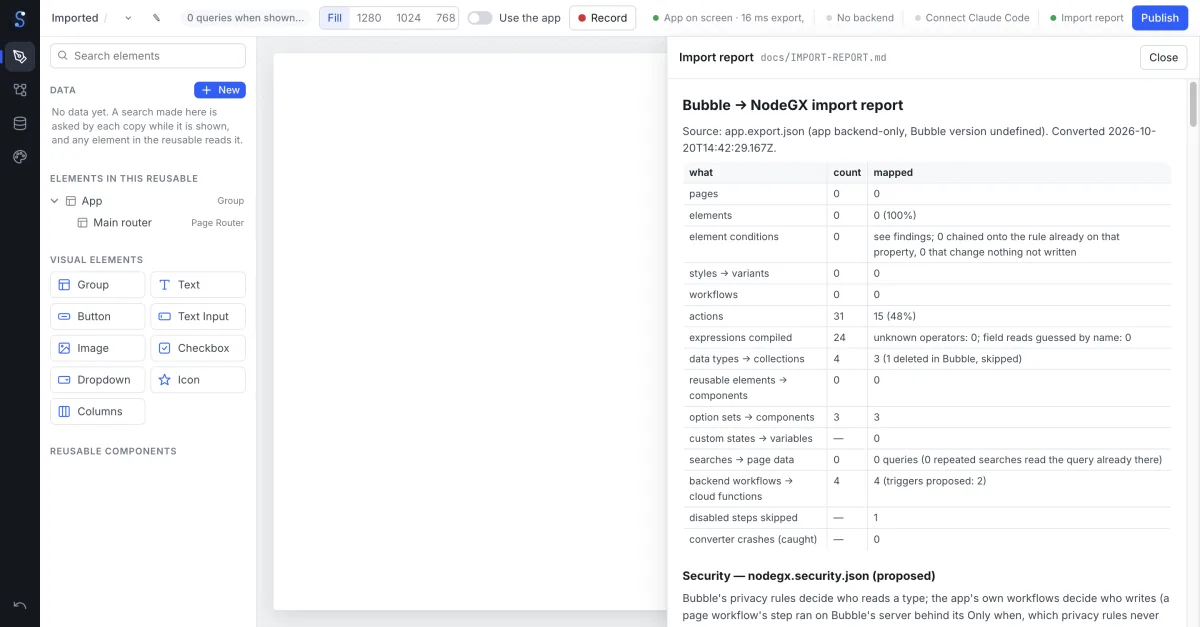
The import report. What was found, what was mapped, and what was left as a placeholder, inside the new project.
Where it stands
Early, and measured
Studio is at version 0.1. The editor, the importer and the run timeline work and have automated checks. The desktop app opens, imports and publishes a project. The next line is a signed build. Someone who is not us downloads it, opens or imports an app, changes it and publishes it.
NodeGX Studio is an independent open-source project of The Low Code Foundation, licensed GPL-3.0. It is not affiliated with, endorsed by or supported by Bubble Group, Inc. Bubble is a trademark of Bubble Group, Inc.